React Native vs KMP vs Full Native: The Cross-Platform Mobile Guide That Doesn’t Waste Your Time
Three real options. One honest comparison. And the one factor that flips the entire decision — which most guides conveniently skip.
Every mobile team hits the same wall eventually. You’re maintaining two codebases, duplicating bugs across platforms, and watching your iOS and Android features slowly drift apart like estranged siblings at a family wedding. So someone in a meeting says the dreaded words — “What if we go cross-platform?” — and suddenly everyone has opinions, ego, and a Medium article to share.
So here’s mine. But I’ll try to actually be useful.
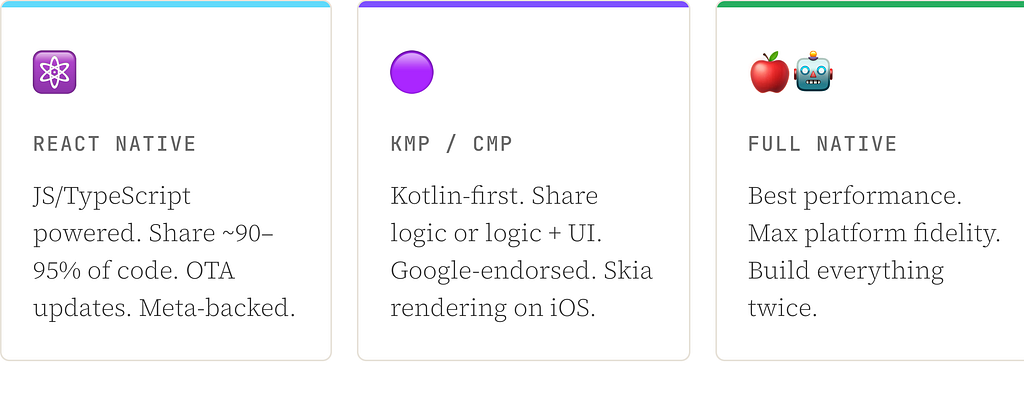
This guide covers the three real options in 2026: React Native, Kotlin Multiplatform / Compose Multiplatform (KMP/CMP), and just staying Full Native. I’ll cut through the marketing copy and give you what actually matters — especially if your app has custom UI. And if it does, buckle up, because that changes everything.
Where Things Actually Stand in 2026
Before we pick sides, let’s establish where things actually stand. These aren’t just blog opinions — the frameworks have genuinely evolved.
React Native
React Native is at v0.84 (February 2026). The Legacy Architecture is completely gone — RN 0.82 dropped it, and 0.84 cleaned up the binaries. Hermes V1 is now default. The New Architecture (Fabric + JSI + TurboModules) is the only architecture. It’s a more capable RN than 2022, but structurally, it’s still a JS runtime inside your app.
KMP / CMP
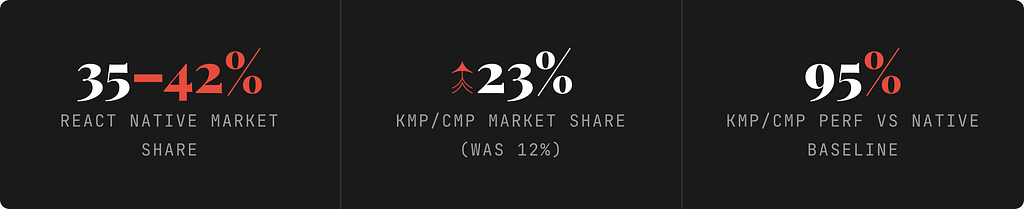
KMP/CMP has had a proper glow-up. Google officially declared KMP stable for business logic sharing in late 2023. Compose Multiplatform (the UI layer) reached stable on iOS in CMP 1.8.0 (May 2025), and CMP 1.10.0 added unified Previews, Navigation 3, and stable Compose Hot Reload. KMP has surged from 12% to 23% market share in 18 months — the fastest-growing cross-platform option right now.
Full Native
Full Native is unchanged and unbothered. Jetpack Compose on Android and SwiftUI on iOS are both mature. If your team is already here, nothing has changed — except the duplication problem continues to compound.
The Thing Everyone Forgets: Custom UI Changes Everything
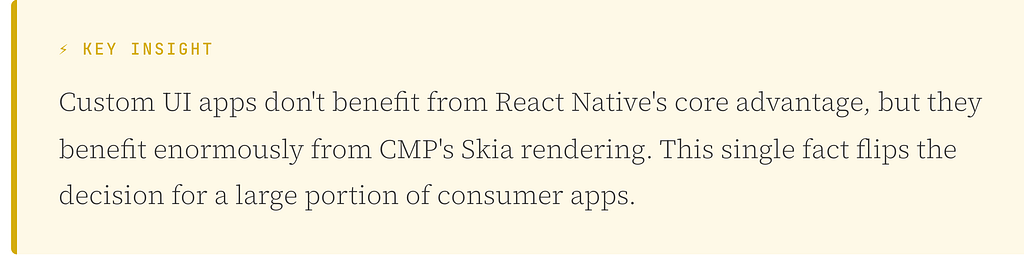
Most framework comparisons assume your app uses standard native widgets — buttons, tab bars, bottom sheets, system alerts. If that’s you, fine. But if your app has custom animations, bespoke design systems, or pixel-perfect branded UI, those comparisons are basically useless for your situation.
If your app doesn’t use native widgets anyway, React Native’s “real native views” advantage evaporates entirely.
Here’s how custom UI reshapes the decision at every layer:
React Native’s main selling point is that it renders actual native UIKit/Android views. On a screen full of custom-drawn components? That advantage is irrelevant — you’re not using those native views anyway.
CMP’s Skia canvas is literally built for custom rendering. Your custom card animation, your branded progress ring, your fancy onboarding screen — Skia draws all of it identically on both iOS and Android. No “does this look right on iOS?” second-guessing.
The “CMP doesn’t feel native on iOS” criticism? Valid — for standard system UI. Completely moot if your app’s UI is custom-designed.
KMP vs CMP: They’re Not Competitors — They’re Layers
A lot of people treat KMP and CMP as two separate options. They’re not. Think of them as a stack you can opt into at different depths:
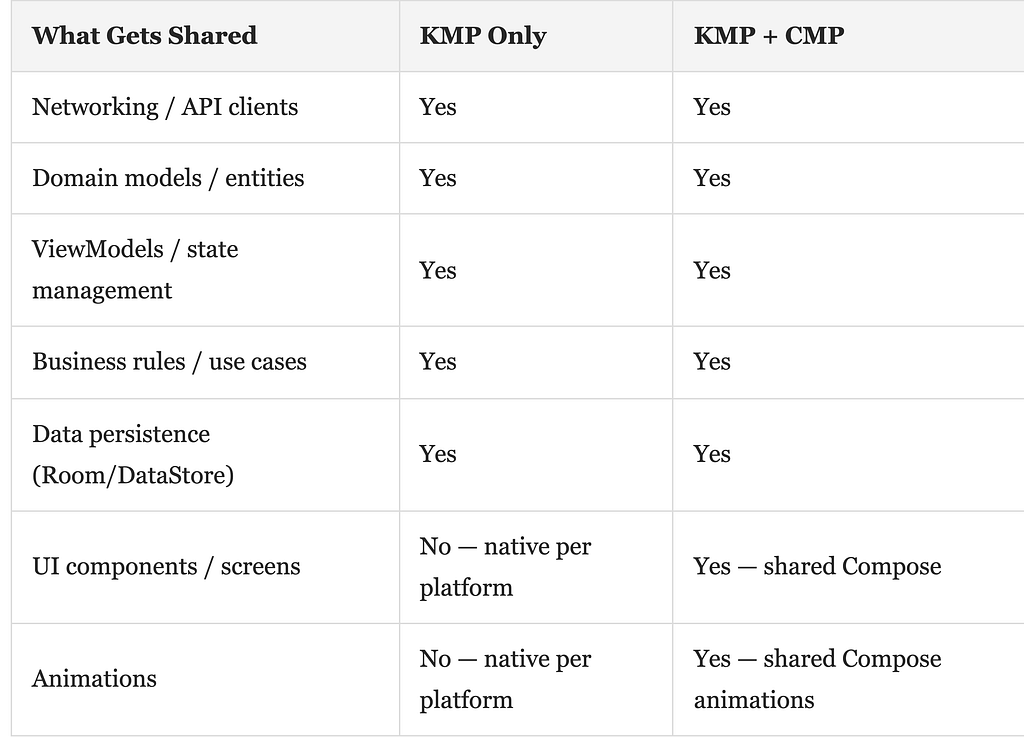
KMP (the foundation) shares your business logic — networking, domain models, ViewModels, repositories, data persistence. Your UI stays native on each platform. This is the lowest-risk, highest-ROI starting point.
CMP (the optional layer on top) takes it further and shares the UI too — Compose composables rendered via Skia on iOS, standard Compose on Android. Same code, same pixels, both platforms.
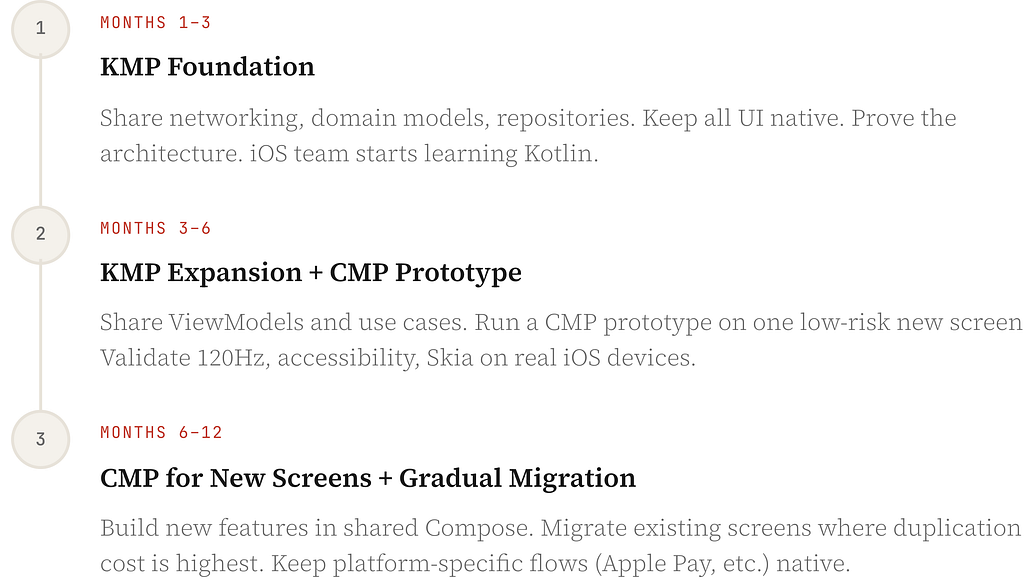
The recommended path is simple: start with KMP, graduate to CMP. Don’t try to do both at once on a production app.
Performance: Let’s Put Numbers On It
Performance debates in cross-platform usually devolve into vibes and anecdote. So here are the actual benchmarks as of 2026:
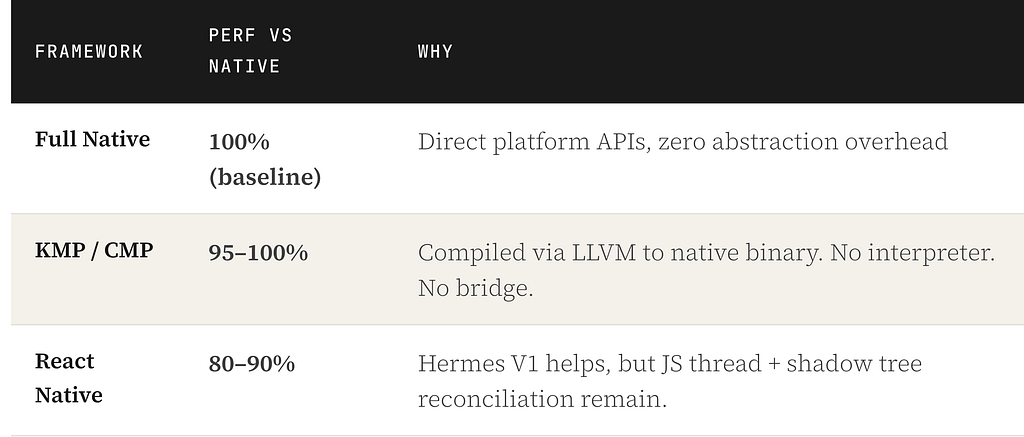
The RN gap matters most in two scenarios: custom animations and large list rendering. RN animations must avoid the JS thread entirely (via Reanimated’s native driver) or you’ll get jank. FlatList requires constant tuning. KMP/CMP and native don’t have this problem — their animation logic compiles directly to native code.
Frame budgets are unforgiving at 120Hz. You have 8.33ms to render each frame on an iPhone with ProMotion. If your JS thread is doing heavy work, you’ll miss that deadline. Users will feel it even if they can’t name it.
OTA Updates: The Double-Edged Sword
React Native’s OTA story (via Expo EAS Update) is genuinely one of its best features. Push a JS bundle update, users get it without a store release. Ship a fix in an hour. It sounds incredible — and it is, right up until it isn’t.
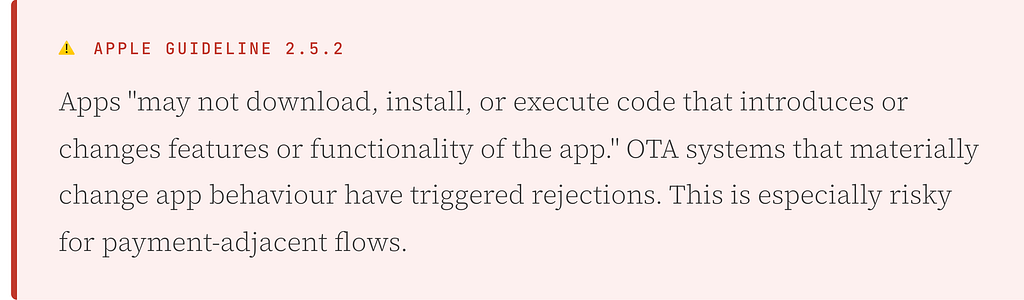
Google Play has similar restrictions: apps may not modify or replace themselves outside Google Play’s update mechanism, with an explicit exception for code running in a VM with indirect API access — which is exactly how RN’s JS works. So technically, RN OTA is on firmer ground on Android, but the iOS risk is real.
The practical rule: use OTA as a safety valve for copy fixes, minor UI tweaks, and crash hotfixes. Don’t use it as a feature delivery mechanism, and absolutely don’t use it to change anything related to payments or permissions.
KMP/CMP and native don’t have OTA. They also don’t have the compliance headache that comes with it.
Security & Payments
Payment handling deserves its own discussion because the security posture of each framework is materially different.
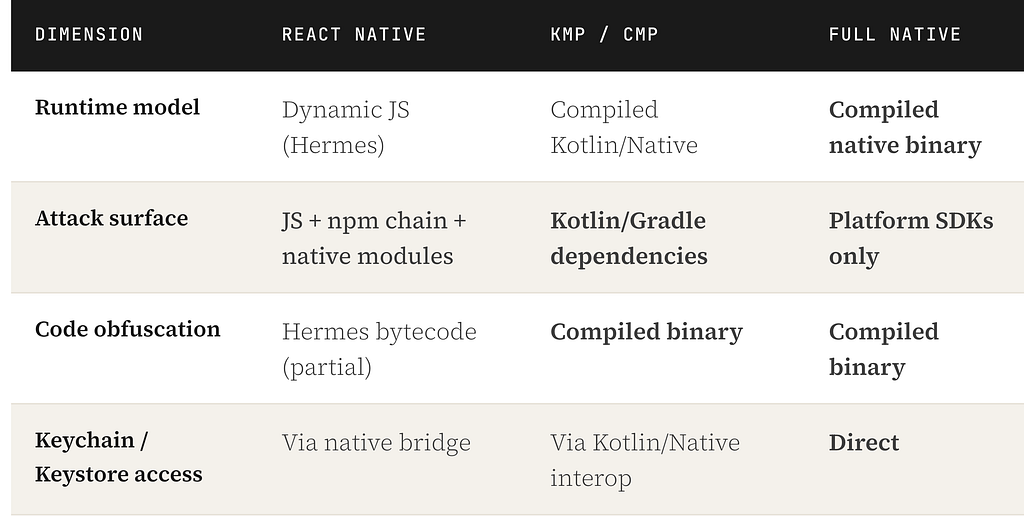
For payment flows specifically: regardless of which framework you pick, integrate payment provider SDKs at the native layer. Never store raw card data on device. Always use platform secure storage — iOS Keychain, Android Keystore. These rules apply universally.
On store rules: if your app sells physical goods or services consumed outside the app (food delivery, e-commerce, ride-hailing), Apple allows non-IAP payments and Google Play doesn’t require Play Billing. Digital content is a different story — IAP/Play Billing is mandatory. Worth verifying your exact category.
Who’s Actually Using This in Production?
Framework debates are fun in theory. Production data is more convincing.
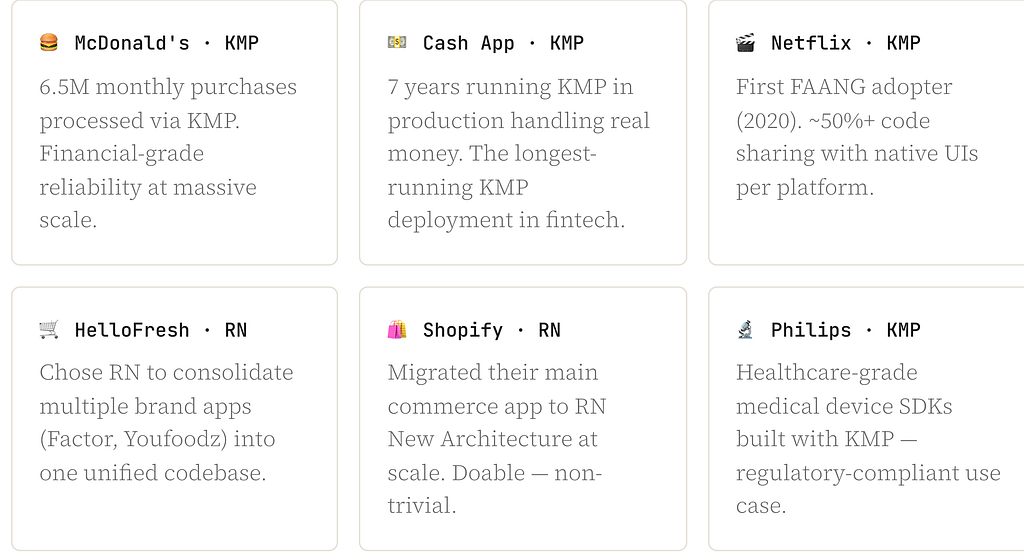
The KMP roster includes a payment processor at 6.5M monthly transactions and a fintech app running for 7 years. If that doesn’t put the “KMP isn’t production-ready” argument to rest, nothing will.
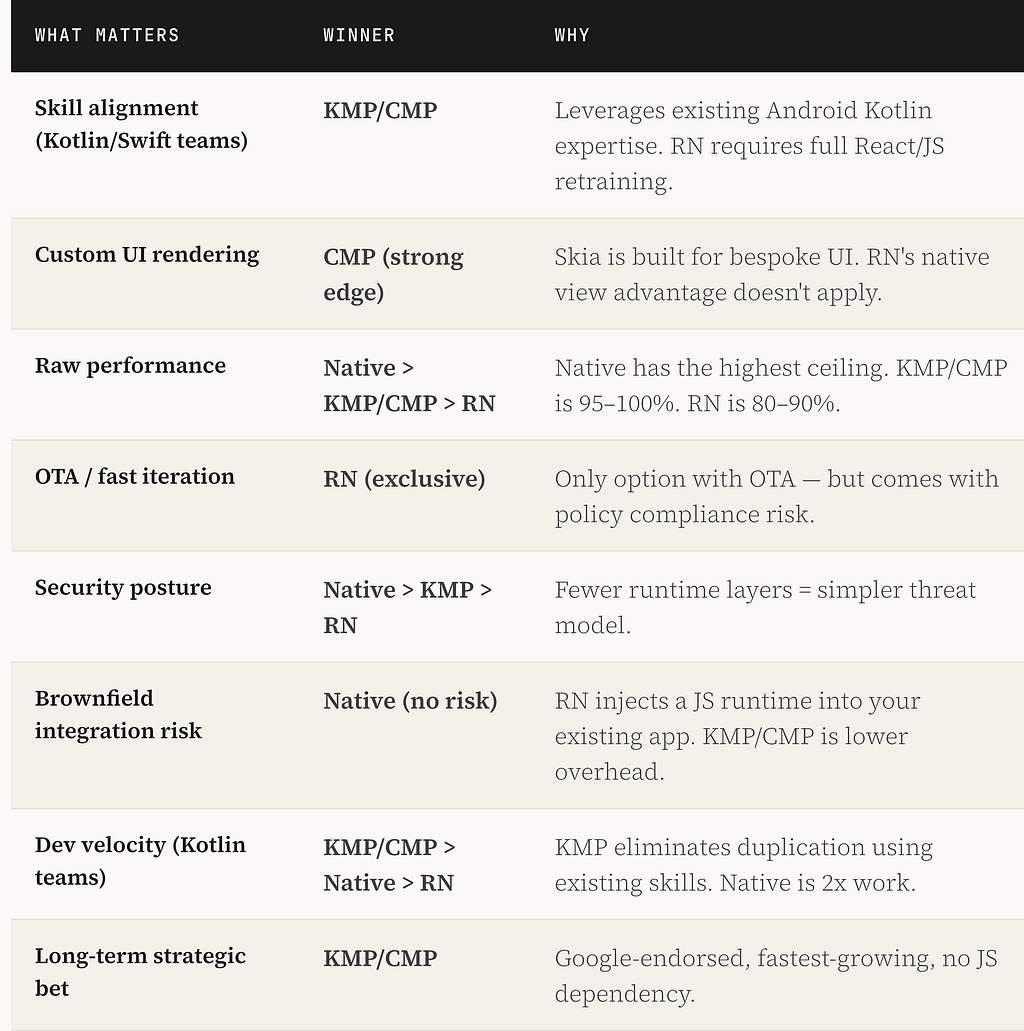
The Head-to-Head: What Actually Matters
The Adoption Roadmap (for KMP/CMP)
If KMP/CMP is the direction, don’t try to migrate everything at once. The phased approach is the only sane one for a production app.
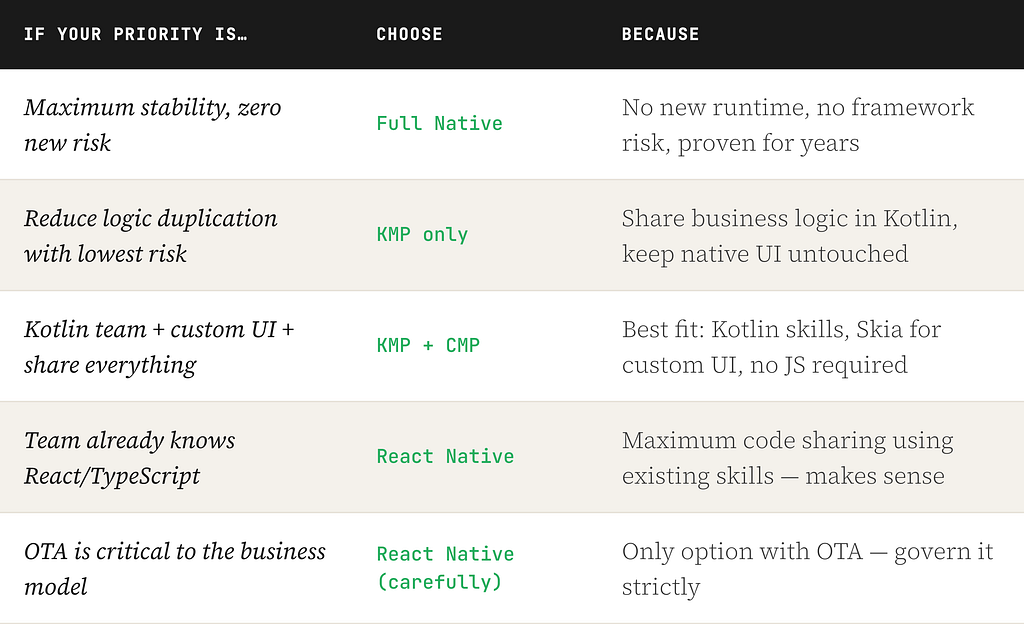
The Decision Matrix (for Humans)
Stop overthinking it. Run through this:
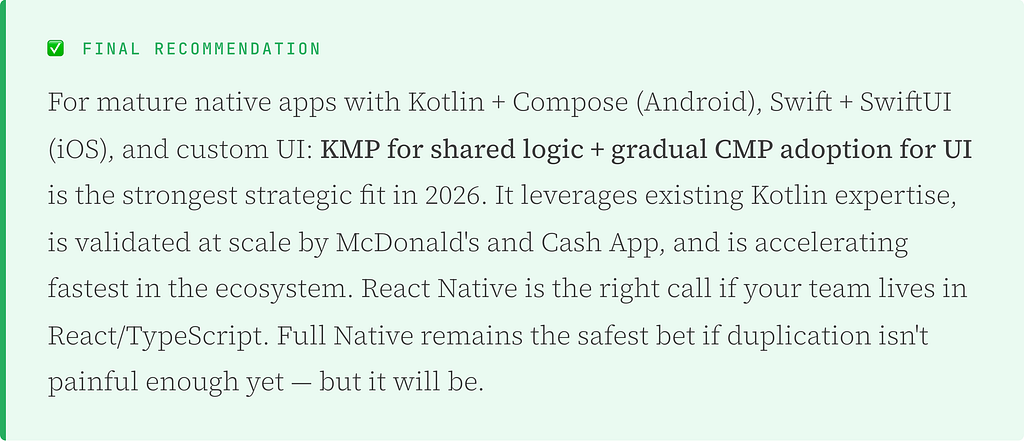
The Bigger Takeaway
Most cross-platform decisions go wrong not because the team picked the wrong framework, but because they picked a framework optimised for a different team’s profile. React Native makes enormous sense if you have React engineers or want to share code with a web team. KMP/CMP makes enormous sense if you have a Kotlin-first Android team and a custom UI. Neither is universally right.
The question to ask isn’t “which framework is best?” It’s “which framework fits the team we actually have, the app we actually built, and the direction we actually want to go?”
Answer that honestly — without the hype — and the decision usually becomes obvious.
Quick Reference
- React Native v0.84 — New Architecture only, Hermes V1, Fabric renderer, React 19, OTA via Expo EAS
- KMP — Stable since Nov 2023, Google-endorsed, compiles to native via LLVM on iOS, AndroidX libraries gaining KMP support
- CMP 1.10.0 — iOS Stable since 1.8.0 (May 2025), Skia/Metal on iOS, 120fps ProMotion confirmed, Navigation 3, Compose Hot Reload
- Performance: Native (100%) > KMP/CMP (95–100%) > React Native (80–90%)
- OTA: React Native only. Apple Guideline 2.5.2 applies. Keep it a safety valve, not a feature channel.
- Custom UI: CMP’s Skia rendering is the correct answer. RN’s native view advantage doesn’t apply.
- Production validation: McDonald’s (6.5M payments/month, KMP), Cash App (7 years, KMP), HelloFresh (consolidation, RN), Shopify (scale, RN)
Working through a cross-platform decision on your own team? Drop a comment — always curious how others are weighing these trade-offs in practice.
Tags: React Native Kotlin Multiplatform KMP Compose Multiplatform Cross-Platform Mobile iOS Development Android Development Mobile Architecture Jetpack Compose SwiftUI Mobile Performance Mobile Engineering